Step 1: Create or Log Into Your Account
If you’re new to Crax.shop, click on the "Sign Up" button and enter your details (name, email address, password).
Already have an account? Just log in with your credentials.
For a faster experience, you can also link your account with Google or social media.

Step 2: Browse or Search for Products
• Use the Quick Search bar to find products instantly by entering keywords.
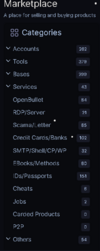
• Explore product categories to discover trending and popular items.
• Refine your search with filters such as price range, brand, ratings, and availability.

Step 3: View Product Details
Click on a product to open its detailed page. Here you can:
✔ Review the product description, price, and images.
✔ Check customer reviews and seller ratings.
✔ Look for discounts, deals, or bundles to maximize value.

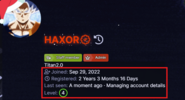
Note: Always check the seller’s activity — Last Seen, Level, Membership, and Registration status.

Step 4: Proceed to Buy
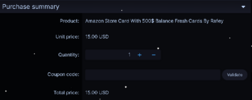
Click on the "Buy" button to start the checkout process.
Double-check product details, price, and quantity.
If you have a coupon code, apply it for discounts.
You can also buy for a friend — the product will be delivered directly to their account after purchase.
Step 5: Choose a Payment Method
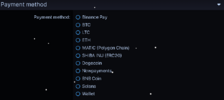
Crax.shop offers multiple secure payment options.
Simply select your preferred method and follow on-screen instructions to complete the transaction.
Tips for a Great Shopping Experience
✔ Check Reviews – Read customer feedback for product quality.
✔ Compare Prices – Explore alternatives to get the best deal.
✔ Verify Seller Ratings – Trusted sellers = safer purchases.
✔ Stay Updated – Watch out for flash sales and special discounts.
Conclusion
Buying from Crax.shop is simple, secure, and convenient.
Whether it’s for personal use or gifting, you’ll enjoy:
• Wide product variety
• Trusted sellers
• Secure payments
• Smooth delivery process
Happy Shopping!